Skip to content
PowerBGInfo

DesktopManager 4.5.0 for Windows

Control the Windows desktop

Arrange monitors, place windows, set wallpapers and switch audio, power, radios and devices. Use the tray app with hotkeys and rules, or automate the same things from PowerShell, C#, the command line or an AI agent.

PS> Install-Module DesktopManager
Cmdlets
133
Release
4.5.0
License
MIT
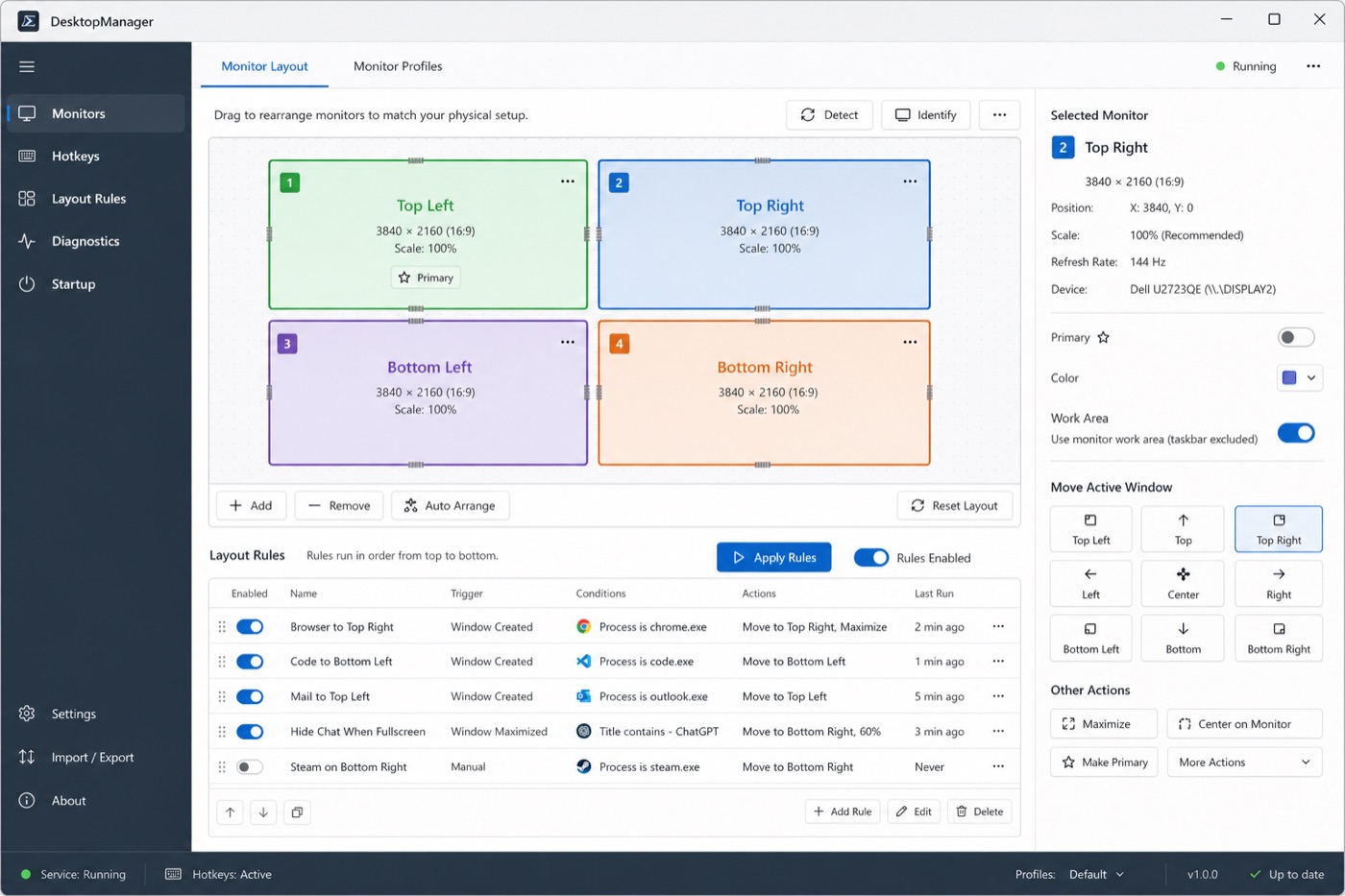
Planned app design
Design mockup of the planned DesktopManager Monitors page: four monitors arranged on a canvas, a list of layout rules and buttons that move the active window.
Design mockup of the Monitors page. Not a shipped screen.

What it controls

Each area below ships today in the PowerShell module and the .NET library. The names under each card are real cmdlets you can run.

  • 01

    Monitors and layout

    List monitors, move them on the virtual desktop, change resolution and orientation, and set brightness. Save the whole setup as a workstation profile and restore it later.

    • Get-DesktopMonitor
    • Set-DesktopPosition
    • Set-DesktopResolution
    • Set-DesktopBrightness
    • Save-DesktopWorkstationProfile
  • 02

    Windows

    Find windows by title or process, then move, resize, snap, keep on top or fade them. Save a window layout and put every window back later.

    • Get-DesktopWindow
    • Set-DesktopWindow
    • Set-DesktopWindowSnap
    • Set-DesktopWindowTransparency
    • Restore-DesktopWindowLayout
  • 03

    UI automation

    Read the controls inside a window through Win32 or UI Automation, then click, type and check values directly. Wait for a window or control to appear instead of sleeping.

    • Get-DesktopWindowControl
    • Invoke-DesktopControlClick
    • Set-DesktopControlText
    • Wait-DesktopWindowControl
  • 04

    Wallpaper and lock screen

    Set a different wallpaper on each monitor from a file, URL or stream. Run and step slideshows, keep a wallpaper history and set the lock screen image.

    • Set-DesktopWallpaper
    • Start-DesktopSlideshow
    • Step-DesktopSlideshow
    • Set-LogonWallpaper
    • Set-DesktopBackgroundColor
  • 05

    Taskbar and personalization

    Find each taskbar and the monitor it sits on, move or hide it and switch auto-hide. Save a personalization snapshot before you change a theme.

    • Get-DesktopTaskbar
    • Set-TaskbarPosition
    • Set-DesktopTaskbarAutoHide
    • Save-DesktopPersonalization
  • 06

    Audio

    List playback and recording devices with volume, mute and default roles. Change the default device for each role and react when a device appears or changes.

    • Get-DesktopAudioEndpoint
    • Set-DesktopAudioEndpoint
    • Set-DefaultAudioDevice
    • Register-DesktopAudioEvent
  • 07

    Power and session

    Read battery and session state, lock or sign out, sleep or hibernate, and keep the machine and display awake for a set time.

    • Get-DesktopPowerStatus
    • Get-DesktopSession
    • Lock-DesktopSession
    • Start-DesktopKeepAwake
    • Suspend-DesktopSystem
  • 08

    Wi-Fi and radios

    Turn Wi-Fi, Bluetooth and mobile broadband radios on or off through the supported Windows radio API. Connect a saved Wi-Fi profile without scanning or reading credentials.

    • Get-DesktopRadio
    • Set-DesktopRadio
    • Get-DesktopWifiProfile
    • Connect-DesktopWifiProfile

    Global airplane mode is experimental and needs -Experimental.

  • 09

    Devices and drivers

    List Plug and Play devices and the ones with problems. Enable, disable or restart a device, update its driver and manage Driver Store packages.

    • Get-DesktopDevice
    • Disable-DesktopDevice
    • Restart-DesktopDevice
    • Update-DesktopDeviceDriver
    • Add-DesktopDriverPackage
  • 10

    Virtual desktops

    Check which virtual desktop a window is on and move it to another desktop through the public Windows API.

    • Get-DesktopVirtualDesktop
    • Move-DesktopWindowToVirtualDesktop

    Listing, creating, renaming and switching desktops are not supported.

  • 11

    Screenshots and input

    Capture every monitor, one monitor, a region or a single window. Move and click the mouse, drag, scroll, press keys and read or set clipboard text.

    • Invoke-DesktopScreenshot
    • Invoke-DesktopWindowScreenshot
    • Invoke-DesktopMouseClick
    • Invoke-DesktopKeyPress
    • Set-DesktopClipboardText
  • 12

    Hotkeys and events

    Bind a global hotkey to a PowerShell script block. Run code when monitors, resolution, orientation, the session, audio devices or radios change.

    • Register-DesktopHotkey
    • Register-DesktopMonitorEvent
    • Register-DesktopSessionEvent
    • Register-DesktopRadioEvent

Four ways to use it

The app, the cmdlets, the CLI and the MCP server all sit on one C# library, so a window move or a wallpaper change behaves the same way wherever you start it.

The app In development

Tray app with hotkeys and layout rules

A Windows app for daily use at your own desk. It has no installer release yet; build it from the repository.

  • Tray icon, start with Windows and start minimized to the tray
  • Global hotkeys that maximize or restore the active window, or move it to the left half, the right half or an exact rectangle on a chosen monitor
  • Layout rules that match windows by title and process name, applied on demand or when the app starts
  • HDR on or off for each monitor
  • A Desktop state tab for workstation profiles, audio, keep-awake, taskbar auto-hide, radios and virtual desktops
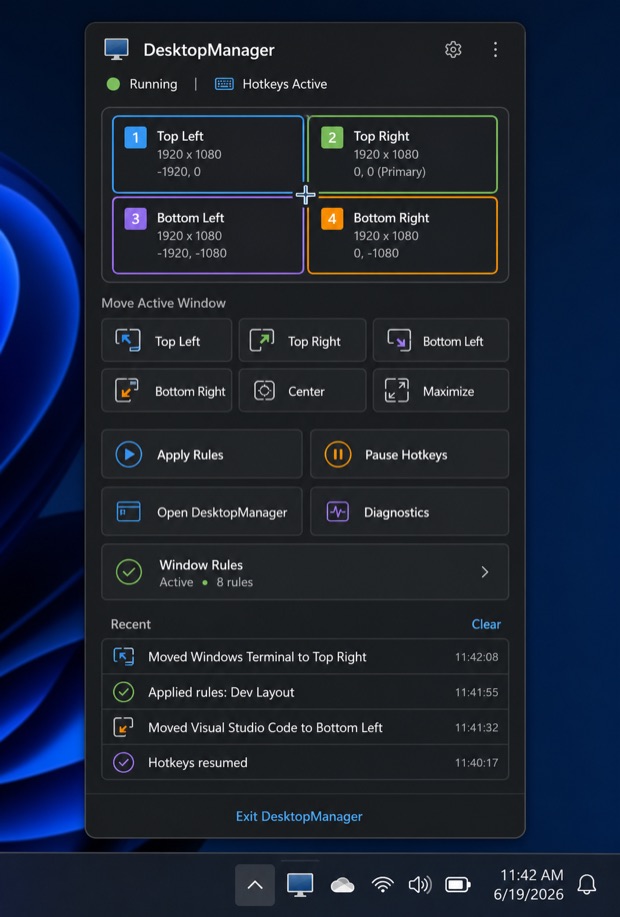
Planned design
Design mockup of the planned DesktopManager tray flyout: a four-monitor map, buttons that move the active window, Apply Rules, Pause Hotkeys and recent activity.
The tray flyout the app is heading towards. Not a shipped screen.

PowerShell

133 cmdlets for scripts and admin work

Run them by hand, in scheduled tasks or in deployment scripts. Works in Windows PowerShell 5.1 and PowerShell 7.

PS> Install-Module DesktopManager
PowerShell
Get-DesktopMonitor -ConnectedOnly | Format-Table
Set-DesktopWallpaper -Index 1 -WallpaperPath 'C:\Wallpapers\wide.jpg' -Position Fit
Set-DesktopWindowSnap -Name '*Notepad*' -Position Left

Save-DesktopWorkstationProfile -Name 'office'
Restore-DesktopWorkstationProfile -Name 'office' -Confirm

Register-DesktopHotkey -Key F12 -Modifiers Control,Alt -Action { Lock-DesktopSession }

.NET library

The DesktopManager NuGet package

Put the same engine inside your own app or service. Targets .NET Framework 4.7.2, .NET Standard 2.0, .NET 8 and .NET 10.

> dotnet add package DesktopManager
C#
using DesktopManager;

var monitors = new Monitors();
foreach (MonitorSnapshot display in monitors.GetMonitorSnapshots()) {
    Console.WriteLine($"{display.DeviceName}: {display.Width} x {display.Height}");
}

var windows = new WindowManager();
WindowInfo? editor = windows.GetWindows(processName: "notepad").FirstOrDefault();
if (editor != null) {
    windows.SnapWindow(editor, SnapPosition.Left);
}

CLI and MCP

A command line, and an MCP server for AI agents

desktopmanager.exe returns plain text or JSON. desktopmanager mcp serve gives an agent more than 100 tools over stdio. It starts read-only: changing windows, changing system settings and experimental features each need their own switch, and --dry-run previews a change without making it.

Portable CLI and MCP bundle on GitHub Releases

Shell
desktopmanager monitor list --json
desktopmanager window snap --process notepad --position left
desktopmanager layout save coding
desktopmanager layout apply coding --validate

desktopmanager mcp serve
desktopmanager mcp serve --allow-mutations --allow-process notepad
desktopmanager mcp serve --dry-run
JSONMCP client configuration
{
  "mcpServers": {
    "desktopmanager": {
      "type": "stdio",
      "command": "desktopmanager",
      "args": ["mcp", "serve"]
    }
  }
}

What's available

Engine means the library and cmdlets in release 4.5.0. App today means the current DesktopManager.App build from source. Next for the app is where the app is heading; nothing in that column ships yet.

  • Shipped in release 4.5.0
  • In app build in the app's source build
  • Partial some of it works
  • Planned on the app plan, not built
  • Not yet not there today
CapabilityEngineApp todayNext for the app
Monitor layout and profilesShippedPosition, resolution, orientation and workstation profilesPartialWorkstation profiles and per-monitor HDR; no layout canvas yetPlannedDrag-to-arrange monitor canvas
Window hotkeys and snappingShippedSet-DesktopWindowSnap and Register-DesktopHotkeyIn app buildMaximize, restore, halves and exact rectangles on a chosen monitorPlannedHotkey recorder and conflict warnings
Window layout rulesPartialMatch and place windows from a script; the rule engine lives in the appIn app buildMatch by title and process; apply on demand or at app startPlannedRule priority, preview of matching windows and per-rule results
Save and restore window layoutsShippedSave-DesktopWindowLayout and the CLI layout commandsNot yetPlanned
Wallpaper per monitor and slideshowShippedPer-monitor wallpaper, slideshows, history and lock screenPartialSaved and restored inside workstation profilesPlanned
Event triggersShippedMonitor, resolution, orientation, session, audio and radio eventsNot yetRules run on demand or at app startPlanned
Brightness and dimming inactive monitorsPartialBrightness per monitor; no dimmingPartialBrightness restored with workstation profiles where the monitor supports itPlanned
Taskbar on every monitorPartialMoves, hides and auto-hides the Windows taskbarsPartialTaskbar auto-hide switchNot started
Audio, power, keep-awake and radiosShippedIn app buildDesktop state tab—
Run PowerShell from a hotkeyShippedRegister-DesktopHotkey with a script blockNot yetPlanned
AI agent control through MCPShippeddesktopmanager mcp serve, CLI 0.2.1Not applicableThe MCP server runs from the CLI—
Phone controlNot startedNot yetNot started

Cross-platform Preview

Displays and wallpaper on macOS and Linux

PortableDesktopService in the .NET library finds displays, reads the user session and reads or applies a wallpaper on Windows, macOS, GNOME and KDE Plasma. It is merged into the source and not in a release yet. The app, the CLI and the cmdlets stay Windows only.

CapabilityWindowsmacOSGNOMEKDE Plasma
Find displaysYesPhysical pixels and DPIYesAppKit screensNoPass the image size yourselfNoPass the image size yourself
Read the wallpaperYesYesMay report a HEIC fileYesThe active light or dark imagePartialImage wallpapers only
Apply a wallpaperYesCenter, Tile, Stretch, Fit, Fill, SpanYesCenter, Stretch, Fit, FillYesGNOME's own modesYesCenter, Tile, Stretch, Fit, Fill
Different image per displayYesYesActive Space on each screenNoPartialBy Plasma screen number
Session detailsYesYesConsole user only; SSH is rejectedYesNeeds the graphical session; SSH is rejectedYesNeeds the graphical session; SSH is rejected

Lock screen, all-user settings and slideshows stay Windows only. Your application decides when to refresh the image.

C#PortableDesktopService
using DesktopManager;

var desktop = new PortableDesktopService();
DesktopCapabilities capabilities = desktop.GetCapabilities();
Console.WriteLine($"{capabilities.BackendId}: {capabilities.Message}");

foreach (DesktopDisplayInfo display in desktop.GetDisplays()) {
    Console.WriteLine($"{display.Id}: {display.Width} x {display.Height} pixels");
}

DesktopOperationResult result = desktop.ApplyWallpaper(new DesktopWallpaperRequest {
    FilePath = imagePath,
    Position = DesktopWallpaperPosition.Fill
});
if (!result.Succeeded) {
    Console.Error.WriteLine($"{result.Status}: {result.Message}");
}